Streaming Windows Games with Proton 9 on Amazon GameLift Streams
By Benjamin Meyer, Adam Chernick, and Natasha Rooney | 07 AUG 2025 | In: Amazon EC2, Amazon GameLift, AWS Management Console, Compute, Game Development, Games, Industries, Management Tools
Players expect instant, click-to-play experiences across any device, and Amazon GameLift Streams helps customers build these experiences for games and streaming application use cases. While playing video games traditionally relies on the Windows operating system, Amazon GameLift Streams can run Windows-based games or applications on a Windows runtime or a Proton runtime.
Proton is a compatibility layer that enables Windows executables to run on Linux-based operating systems. Proton achieves this by translating Windows API calls—including graphics and input—to their Linux equivalents, allowing developers to leverage Linux servers for workloads previously limited to Windows.
With this approach, you can reduce your infrastructure costs by up to 63 percent when running a game at the same tenancy while maintaining comparable performance to a Windows runtime. Linux also enables multi-tenancy, meaning you can run two streams on a single GPU, further reducing cost.
We’re announcing support for Proton 9 as a new runtime option for Amazon GameLift Streams, improving compatibility with Windows builds. In this post, we dig deeper into how Proton 9 works and how you can use it to reduce the cost of streaming Windows games or applications to your players.
Amazon GameLift Streams concepts
Amazon GameLift Streams lets you stream games at up to 1080p resolution and 60 frames per second to any device with a browser. Using the AWS global footprint and GPU instances, you can deploy and stream your game content in minutes without source-code changes, and players can start gaming in seconds without installs.
Amazon GameLift Streams uses key terminology and constructs to allow for quick setup and stream management. Understanding these terms helps you configure the right options:
- Runtime environment: The underlying operating system and software running on Amazon Elastic Compute Cloud (Amazon EC2) instances that runs your application. Options include Windows, Ubuntu, and Proton.
- Stream class: Defines the Amazon EC2 instance type and the number of streams that can run concurrently on a single instance.
- Stream group: A construct consisting of your application, stream class, and stream capacity.
- Stream capacity: A numeric value representing how many stream sessions the stream group can run concurrently.
Understanding Proton
Proton is an open-source compatibility layer developed by Valve in collaboration with CodeWeavers to enable Windows games to run on Linux systems. At its core, Proton relies on Wine Is Not an Emulator (Wine), which provides Windows API translation capabilities. However, Wine can struggle with modern 3D graphics, making it difficult to reliably use it for modern 3D games.
Proton enhances the capabilities of Wine by adding an advanced DirectX-to-Vulkan (DXVK) translation layer. DXVK handles the translation of Windows-specific graphics API calls (DirectX) to graphics APIs running on Linux (Vulkan) and supports DirectX 9, 10, and 11. For DirectX 12, vkd3d-Proton is added as a further translation bridge. With these systems, Proton converts the latest Windows graphics and non-graphics API calls into the equivalent Linux and Vulkan operations.
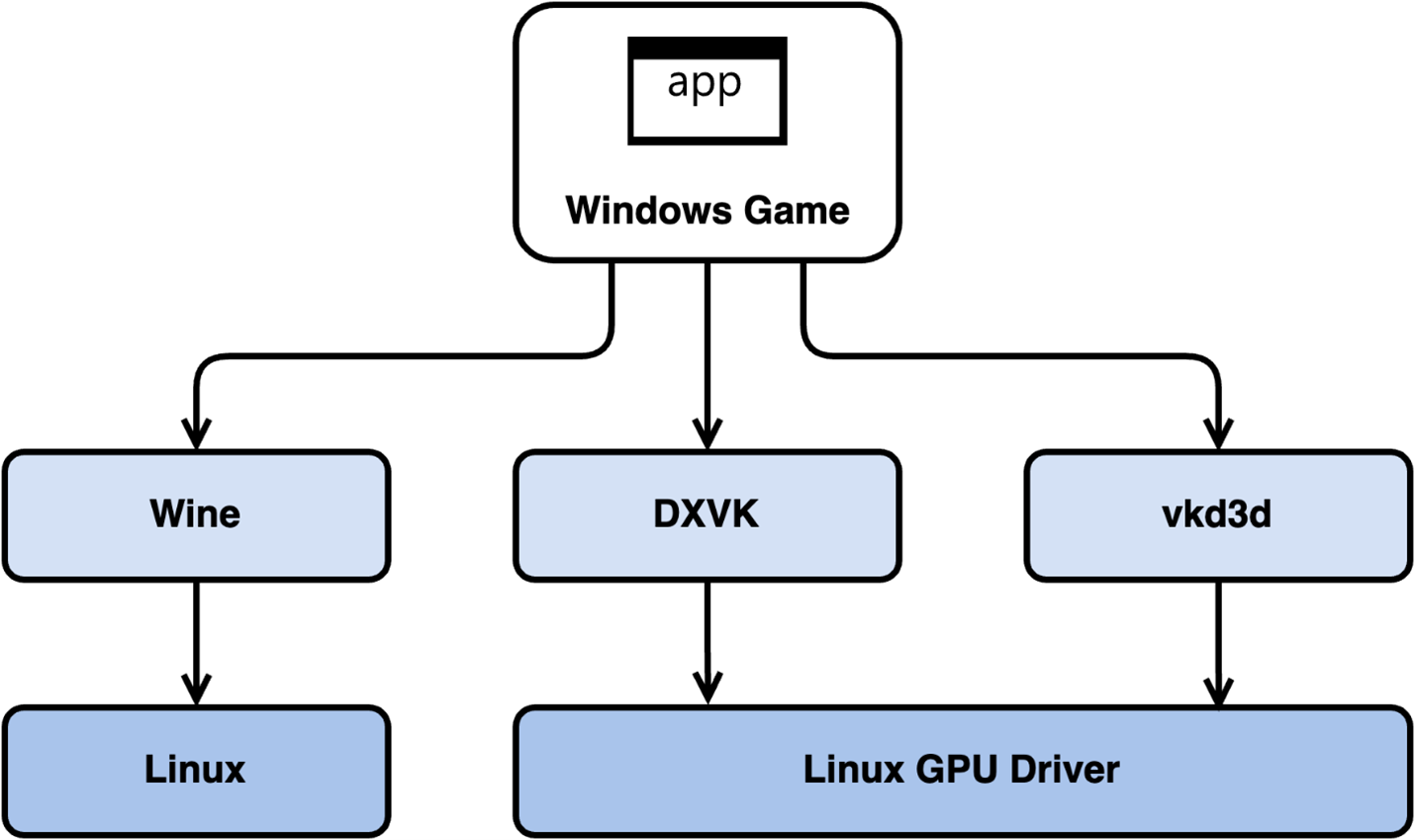
Figure 1: System calls and translation layers.
Amazon GameLift Streams packages custom-built Proton versions: 8.0-2c, 8.0-5, and now 9.0-2 (2024), all optimized for the underlying AWS infrastructure and streaming technology.
Technical and economic advantages
Using the Proton 9 runtime in Amazon GameLift Streams instead of a Windows runtime offers more than license savings. Windows-based stream classes (for example, gen5n_win2022) include the cost of a Windows Server 2022 license and operate in single-tenant mode, meaning each machine serves only one stream session.
In contrast, a stream group using a Linux-based stream class can run multi-tenant; for example, gen5n_high can serve two stream sessions from a single GPU while also eliminating license costs. The underlying Amazon EC2 instance remains dedicated to you even when multiple stream sessions run on it. For less demanding games or applications, Proton 9 is a key tool to optimize infrastructure cost.
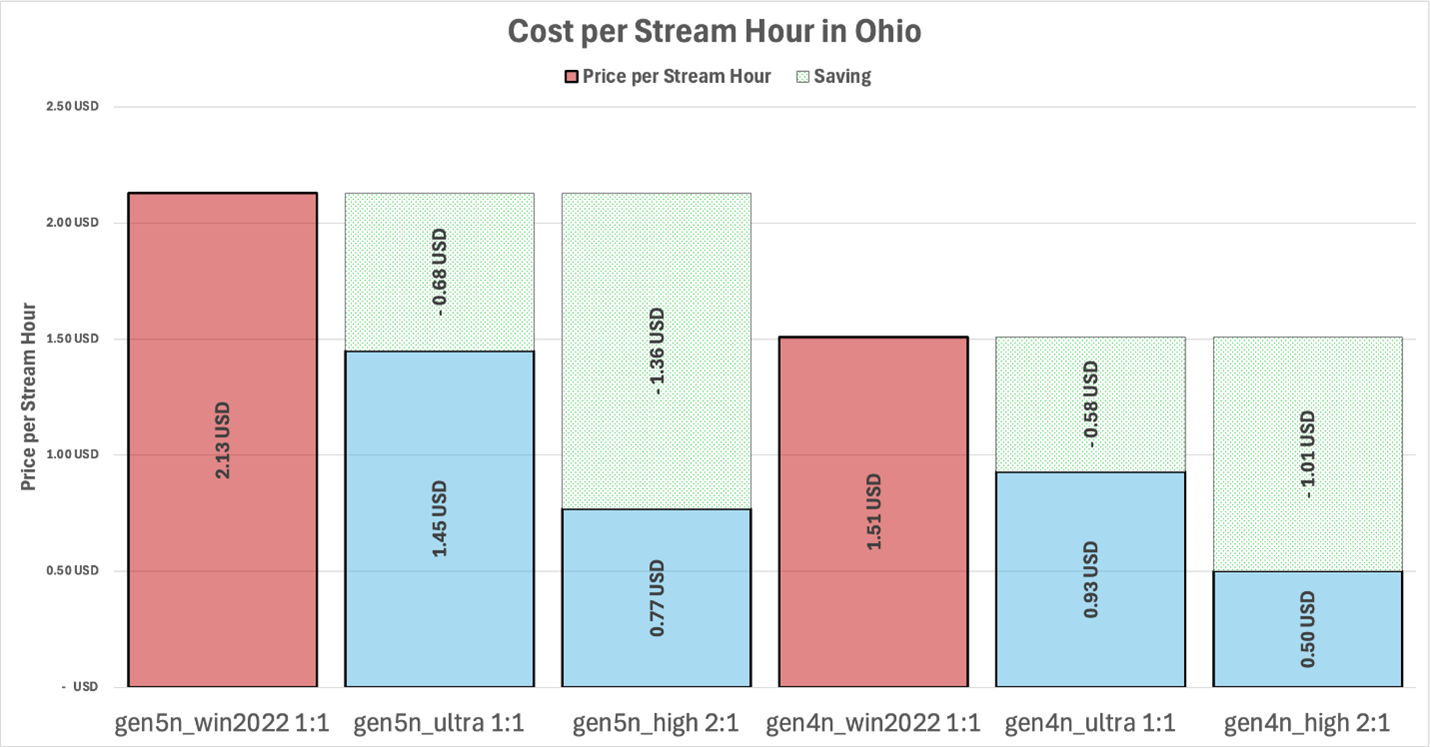
Figure 2: Cost per stream hour across stream classes in Ohio.
Testing game compatibility with Proton 9
The transition to Proton 9 still requires technical consideration. Some anti-cheat software needs Linux compatibility settings or a separate build without anti-cheat. Any kernel-level operations may need specific configuration. Your game may also use operations that Proton cannot translate perfectly to Vulkan graphics APIs.
If you run into compatibility issues with a Proton runtime, first test the latest Proton 9 runtime available in Amazon GameLift Streams. If issues persist, follow the detailed guide to set up an equivalent Amazon EC2 environment for testing and debugging Proton compatibility.
Additional cost-optimization methods
Using Proton 9 is a great way to share GPUs and remove Windows license costs so you can right-size the stream class for your game. Cost optimization matters for consumer-facing scenarios, and Amazon GameLift Streams provides more tools to manage streaming costs.
Know your stream capacity. Stream capacity sets how many streams can be created instantly and can be adjusted via API or the AWS Management Console. Keeping capacity near real demand helps you avoid paying for unused headroom. You can grow or shrink capacity manually, or automatically by calling the Amazon GameLift Streams API based on events (for example, rising player counts) or time windows (for example, the same hour each day).
For scenarios where users can wait up to five minutes for a stream to start—often internal business use cases—customers can use on-demand stream capacity. With this setting, capacity is provisioned only when a stream request arrives and is de-provisioned when the session ends. You pay for stream capacity only when requested and only for the session duration.
Conclusion
The new Proton 9 runtime expands compatibility with DirectX 12 and resolves prior issues. Combined with the latest Amazon GameLift Streams classes, you can optimize streaming costs for AAA titles and further reduce them with multi-tenancy when your game’s performance needs allow it.
Contact an AWS representative to learn how we can help accelerate your business.
Benjamin Meyer

Benjamin Meyer is a Principal Solutions Architect at AWS focusing on Financial Services and Games customers across Central and Eastern Europe, helping solve business challenges through AWS cloud services.
Adam Chernick

Adam Chernick is a Worldwide Senior Solutions Architect specializing in Amazon GameLift Streams. He has devoted his career to real-time 3D, generative AI, and related emerging technologies.
Natasha Rooney

Natasha Rooney is a Senior Solutions Architect at AWS working with Media & Entertainment and Gaming customers to design application and infrastructure architectures on AWS. A passionate gamer, she works with gaming studios and partners to optimize their workloads on AWS.